





Sumbreak Puzzle
Combine matching neighbor tiles to add their values and reduce the board to a single number. Plan every merge carefully so empty spaces do not isolate your pieces.
Sumbreak Puzzle is a number logic game where you condense a crowded grid down to a single winning tile by joining matching adjacent values.
About Sumbreak Puzzle
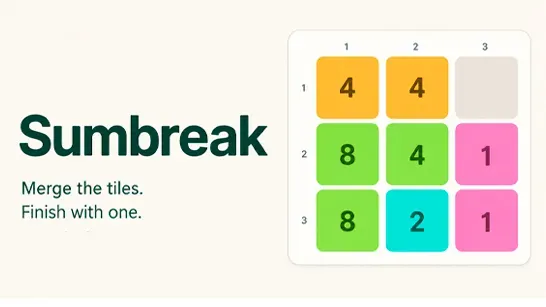
Sumbreak Puzzle challenges you to solve compact arithmetic layouts using spatial foresight. Unlike sliding-tile puzzles where the entire grid shifts with every swipe, each move here happens in place. You pick two identical neighboring tiles that share a flat horizontal or vertical edge and combine them. The tile you move leaves behind a permanent gap, while the destination tile absorbs both numbers and doubles in value.
Because empty squares remain static and do not close up, every merge alters the routes across the board. Making an easy pair without checking its exit can cut off surrounding numbers from future matches. Larger layouts introduce arithmetic wildcards, such as addition and multiplier modifiers, requiring careful order of operations to finish the board.
How to Play Sumbreak Puzzle
The objective is to clear every tile until only one number remains on the grid. In practice boards, that final value must land on the designated finish square.
- Find two adjacent tiles showing the exact same number that touch horizontally or vertically. Diagonal contact does not count.
- Drag one tile onto the other, or select them sequentially. The origin space becomes an empty void, and the target tile displays their combined sum (for example, two 4s become an 8).
- Incorporate special operation tiles when available, such as +3 or ×2, to convert odd amounts into usable targets.
- Work backward from your intended finish square so that you always leave a clear bridge to the next matching sum.
- If you strand a piece or run out of valid neighboring pairs, use the undo button to reverse your recent moves, or call a hint to identify the next safe step.
Tips for Sumbreak Puzzle
- Choose the landing square deliberately: When two matching tiles can combine in either direction, land on the square that keeps contact with the next expected number.
- Protect connective bridges: Avoid clearing central tiles too early, or you may split the board into isolated halves that can never rejoin.
- Plan backward from the finish: Trace the final required tile from the goal square back to the starting layout before making your opening moves.
Game Controls
- Mouse Left-Click or Drag - Select or slide a tile onto a neighboring match
- Arrow Keys - Move cursor across the board
- Enter or Space - Select or deselect the highlighted tile
More Games Like Sumbreak Puzzle
- 2048 - Slides the entire grid simultaneously and spawns new numbers with each swipe, whereas Sumbreak merges individual adjacent tiles in place without shifting surrounding pieces.
- Number Match - Clears pairs of identical numbers or pairs that add up to 10 across open lines of sight, while Sumbreak requires direct edge contact to fold numbers into a single doubled tile.
- TriMerge - Adds 1s and 2s together to create multiples of 3 on an increasingly crowded grid, whereas Sumbreak tasks you with reducing a pre-set board down to one final tile.
FAQ
Can tiles merge diagonally in Sumbreak Puzzle?
No. Tiles only combine if they share a direct horizontal or vertical edge. Corner contact does not count as a valid connection.
Why do tiles stop touching after a move?
Tiles do not collapse or slide to fill vacancies. The square you move away from stays permanently empty, meaning nearby numbers cannot cross that gap unless another merge brings a tile closer.
What do the +3 and ×2 tiles do?
These arithmetic wildcard tiles appear on larger grid sizes like 5×5 and 6×6. Merging a number into them applies that specific mathematical modifier, helping you adjust awkward values into matching pairs.
What happens if I make a move that leaves the board stuck?
You can use the undo function to step back and reopen the path, or reset the layout entirely to test a different sequence.