







Ice Drop: GTA 5
Drive across floating ice tracks in Ice Drop: GTA 5, manage slippery corners, clear gaps, and correct your car in mid-air before landing.
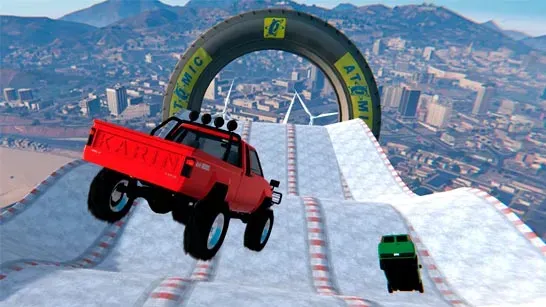
Ice Drop: GTA 5 puts your car on floating ice tracks suspended above snowy mountains. Reach the finish while managing low traction, narrow paths, ramps, gaps, and elevated hazards. The game is credited to MezzleN Dev.
How to Play Ice Drop: GTA 5
Ice gives your tires very little grip, so full acceleration can send the car sliding past a turn. Control your speed before corners and line up the car carefully for each ramp. The tracks include missing sections, narrow routes, red mesh tunnels, and checkered spheres near some jump lines.
Your steering still matters after a jump. Use the movement keys to pitch and roll the car in mid-air, then aim for a level landing on all four wheels. Arriving at a ramp too fast can send you beyond the landing area, while a poor angle can make the car bounce toward the edge.
If the car falls, flips, or crashes, press F to restore it to the track. This reset gets you moving again without restarting from the beginning.
Tips for Ice Drop: GTA 5
- Brake before the corner: Start slowing down early because the icy surface increases your stopping distance.
- Approach ramps with control: Reduce speed before a jump so the car stays within the landing zone.
- Tap the handbrake: Use Space for a quick drift or correction, but holding it too long can spin the car.
- Level the car in the air: Use W, A, S, and D to correct the vehicle before it touches down.
- Reset quickly: Press F as soon as the car falls or lands upside down.
Game Controls
- WASD or Arrow Keys - Accelerate, reverse, and steer the car
- WASD or Arrow Keys in mid-air - Pitch and roll the car
- Spacebar - Use the handbrake for a quick drift or stop
- F - Restore the car to the track after a fall or crash
- C - Change between camera views
- Tab - Open the pause menu