




FreeCell
Play FreeCell online free - the classic solitaire card game where every card is face-up. Use strategy and free cells to move all cards to foundation piles.
All 52 cards are dealt face-up from the start in FreeCell, a solitaire variant that swaps luck for planning. Your job: move every card into four foundation piles, one per suit, from Ace to King.
About FreeCell
FreeCell is a strategic card game in the solitaire family. Unlike traditional Klondike, every card is visible from the opening deal, so success depends on sequencing and smart use of four temporary holding slots called free cells. The game rewards forward thinking and patience, making it a favorite for players who enjoy logic puzzles with a calm pace. Whether you’re looking to sharpen your skill or give your brain a gentle workout, FreeCell offers a satisfying challenge.
How to Play FreeCell
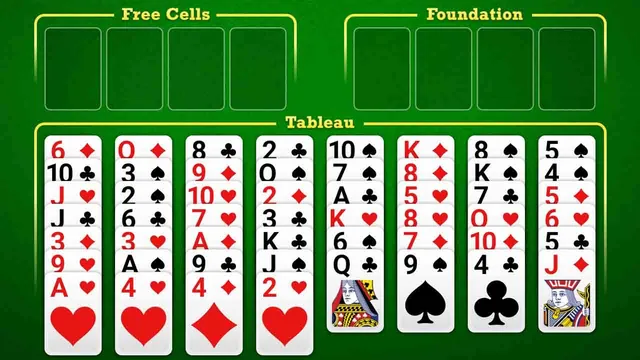
The tableau consists of eight columns: the first four hold seven cards each, the last four hold six. Only the bottom card of each column can be moved. You can move a card onto another tableau card if it is one rank lower and the opposite color. The four free cells in the top left can each hold one card, giving you temporary storage. Foundation piles (top right) are built upward by suit from Ace to King.
Key movement rules:
- Cards can be moved singly or in sequences, depending on the number of empty free cells. For example, 4 empty free cells allow moving 5 cards together. An empty tableau column doubles that capacity.
- Move any Ace to a foundation as soon as it appears, then continue building in suit order.
- Use the Undo button freely-there is no penalty, so you can experiment with different sequences.
Tips for FreeCell
- Keep free cells open - The more empty free cells you have, the longer the sequences you can move. Don’t fill them unless necessary.
- Clear tableau columns early - An empty column gives you a flexible parking space for any single card, which helps reorganize the board.
- Build foundations when safe - Move cards to the foundation piles as soon as it won’t block future moves, especially low cards.
- Look ahead - Scan the entire layout before committing. A few moves of planning can unlock a stuck board.
Game Controls
- Left Click / Drag - Select, move, or place cards between tableau, free cells, and foundation piles
Key Features of FreeCell
All Cards Face-Up
No hidden information means every win or loss comes from your decisions, not luck. Most deals are winnable with the right sequence of moves.
Undo Any Move
Mistakes cost nothing. The undo button lets you reverse as many steps as you like, making it easy to explore different strategies.
FAQ
Is every FreeCell deal winnable?
Most deals are winnable, but not all. The original Microsoft FreeCell implementation numbered 32,000 deals, and almost every one has a solution. Far fewer are truly impossible.
How many free cells are there?
There are four free cells. Each holds exactly one card. They are essential for temporarily parking cards to unlock sequences.
Can I play FreeCell on mobile?
The game uses simple click-and-drag mouse controls, so it works on desktop browsers. Mobile play may require a touch-friendly interface, but the version hosted on OmiGames is designed for desktop.